Workflow 03 · 15 nodes
Cold Outreach & Warm Follow-up Engine
Drafts context-aware outreach, routes it by channel, and keeps the stage record straight
Cold Outreach & Warm Follow-up Engine is one of the four automation workflows built by MatchaFlowAI.
Workflow diagram
n8n workflow
Information
Reads the prospect list and the lead log together, works out who is due for a first approach and who is due for a follow-up, drafts a message specific to that business, routes it to the right channel, and updates the outreach stage — with a manual-review branch for anything that should not go out automatically.
The problem it solves
Outreach dies in the follow-up. The first message gets sent, then the second one depends on someone remembering. Templates get pasted with the wrong business name, nobody is sure who was already contacted, and the same prospect gets approached twice through two different channels.
How it is solved
One scheduled pass reads both sheets, merges them, and works out each prospect’s current stage. Messages are drafted from the specific context recorded for that business rather than from a fixed template. A channel router sends each message the appropriate way, and anything that fails validation is held for a person to review instead of being sent.
How it works
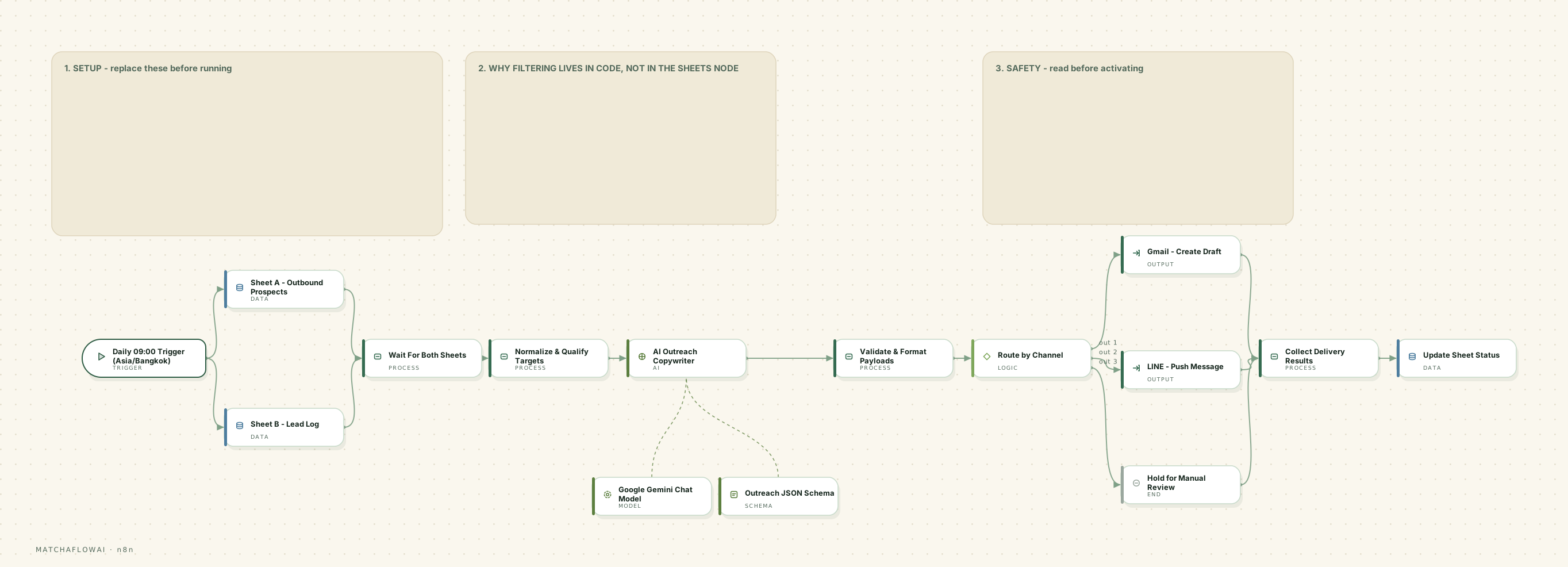
- 01A daily schedule starts the outreach pass at a fixed local time.
- 02The prospect sheet and the lead log are read in parallel, then merged so both are available together.
- 03Targets are normalised and qualified: who is new, who is due a follow-up, and who should be excluded.
- 04For each target, a message is drafted using that business’s recorded context and pain point.
- 05The draft is returned in a fixed structure — subject, body, call to action and recommended channel.
- 06Payloads are validated and formatted; anything incomplete is diverted rather than sent.
- 07A channel router splits traffic between email drafts and messaging, or holds the item for manual review.
- 08Delivery results are collected and the sheet status is updated so the next run knows the stage.
Main capabilities
- Separate handling for first-touch outreach and warm follow-up
- Message drafting from recorded per-business context instead of a fixed template
- Structured output so every message has a subject, body, call to action and channel
- Channel routing between email and messaging
- A manual-review branch for anything that fails validation
- Stage tracking written back so no prospect is contacted twice in one cycle
Example business use cases
- A studio running a small, considered outreach list rather than a bulk campaign
- A team that wants drafts prepared automatically but sent only after a human glance
- Following up enquiries that went quiet, without anyone maintaining a reminder list
- Keeping outreach stage data accurate across a shared sheet
Inputs
- The outbound prospect sheet, including fit analysis and estimated pain point
- The lead log, used to exclude anyone already in conversation
- Outreach stage and last-contacted date per prospect
- Channel availability for each business
Processing
- Merge of both data sources and normalisation into one target list
- Stage logic determining first touch, follow-up, or exclusion
- Message drafting against a fixed output structure
- Validation, channel routing, and status write-back
Outputs
- An email draft prepared for review, or a message dispatched on the configured channel
- Items held in a manual-review branch when validation fails
- Updated outreach stage and timestamp on the source row
- A collected record of delivery results per run
Potential integrations
- Gmail (draft or send)
- Outlook
- SMTP providers
Messaging
- LINE
- Other messaging APIs with business accounts
Records
- Google Sheets
- Airtable
- CRM pipelines
AI
- Google Gemini
- OpenAI
- Anthropic Claude
Integrations depend on which accounts and API access a business already has. These are common options, not a guaranteed list.
Limitations
This workflow is a modular starting point, not a finished product. It is adjusted for each business, and there are things it deliberately does not do.
- Message quality depends on the context recorded for the prospect — thin data produces generic messages.
- It is built for considered volume with review, not mass sending.
- Delivery, deliverability and platform limits are controlled by the email or messaging provider, not the workflow.
- Consent, local marketing rules and platform terms are the operator’s responsibility to comply with.
- Draft-only mode is the recommended default; automatic sending is a deliberate configuration choice.
Simulator
Run the workflow end to end on demonstration data — from the incoming trigger through processing and decisions to the stored record.
Demo simulator
A daily pass drafts a first-touch message and moves a prospect to the contacted stage.
Ready
0%
Runs entirely in your browser on demonstration data. No message is sent, no record is created, and no live business system is contacted.
Pipeline
- SCHEDULED TRIGGERTrigger
The outreach pass starts at the configured local time.
- READ BOTH SHEETSData
Prospect list and lead log are read in parallel, then merged.
- QUALIFY TARGETSProcess
Stage logic decides first touch, follow-up, or exclude.
- DRAFT MESSAGEAI
A message is written from that business’s recorded context.
- VALIDATE PAYLOADDecision
Structure and required fields are checked before anything moves.
- ROUTE BY CHANNELDecision
Email, messaging, or hold for manual review.
- CREATE DRAFTOutput
The message is prepared as a draft for review.
- UPDATE STAGEData
The sheet is updated so the next run knows the stage.
Scheduled run · 09:00
Press EXECUTE WORKFLOW to run the workflow from trigger to stored record.
API Price Comparison
Model choice is a cost decision as much as a quality one. This table is the reference used when scoping a workflow.
- Last updated
- 2026-08-28
- Source
- Built-in defaults
Gemini
Gemini 3 Flash
- Input
- ≈ $0.50
- Output
- ≈ $3
Best for General work, automation, high volume
per 1M tokens · updated 2026-08-28
Gemini
Gemini 3.1 Pro
- Input
- ≈ $2–4
- Output
- ≈ $12–18
Best for Reasoning and complex tasks
per 1M tokens · updated 2026-08-28
OpenAI
GPT-5.6 Luna
- Input
- $0.25
- Output
- $2
Best for High volume, cost-sensitive work
per 1M tokens · updated 2026-08-28
OpenAI
GPT-5.6 Terra
- Input
- $2
- Output
- $12
Best for Balance of cost and capability
per 1M tokens · updated 2026-08-28
OpenAI
GPT-5.6 Sol
- Input
- $4
- Output
- $20
Best for Advanced reasoning and coding
per 1M tokens · updated 2026-08-28
Claude
Claude Haiku 4.5
- Input
- $1
- Output
- $5
Best for Fast and economical
per 1M tokens · updated 2026-08-28
Claude
Claude Sonnet 5
- Input
- $2
- Output
- $10
Best for Agents, automation, coding
per 1M tokens · updated 2026-08-28
Claude
Claude Opus 5
- Input
- $5
- Output
- $25
Best for Heavy reasoning work
per 1M tokens · updated 2026-08-28
marks an estimate, and a range means the provider quotes a band rather than one flat rate.
API pricing can change. Prices shown are for reference and should be verified with the provider. Cost per workflow run also depends on message length, model choice and how many steps call a model — no single provider is always the cheapest or the best fit.
Workflows are modular. If this one is close to what your business needs, it can be adjusted rather than rebuilt.
Discuss a build