Workflow 02 · 18 nodes
Outbound Lead Generation
Finds businesses matching a target profile, then scores them before they reach your list
Outbound Lead Generation is one of the four automation workflows built by MatchaFlowAI.
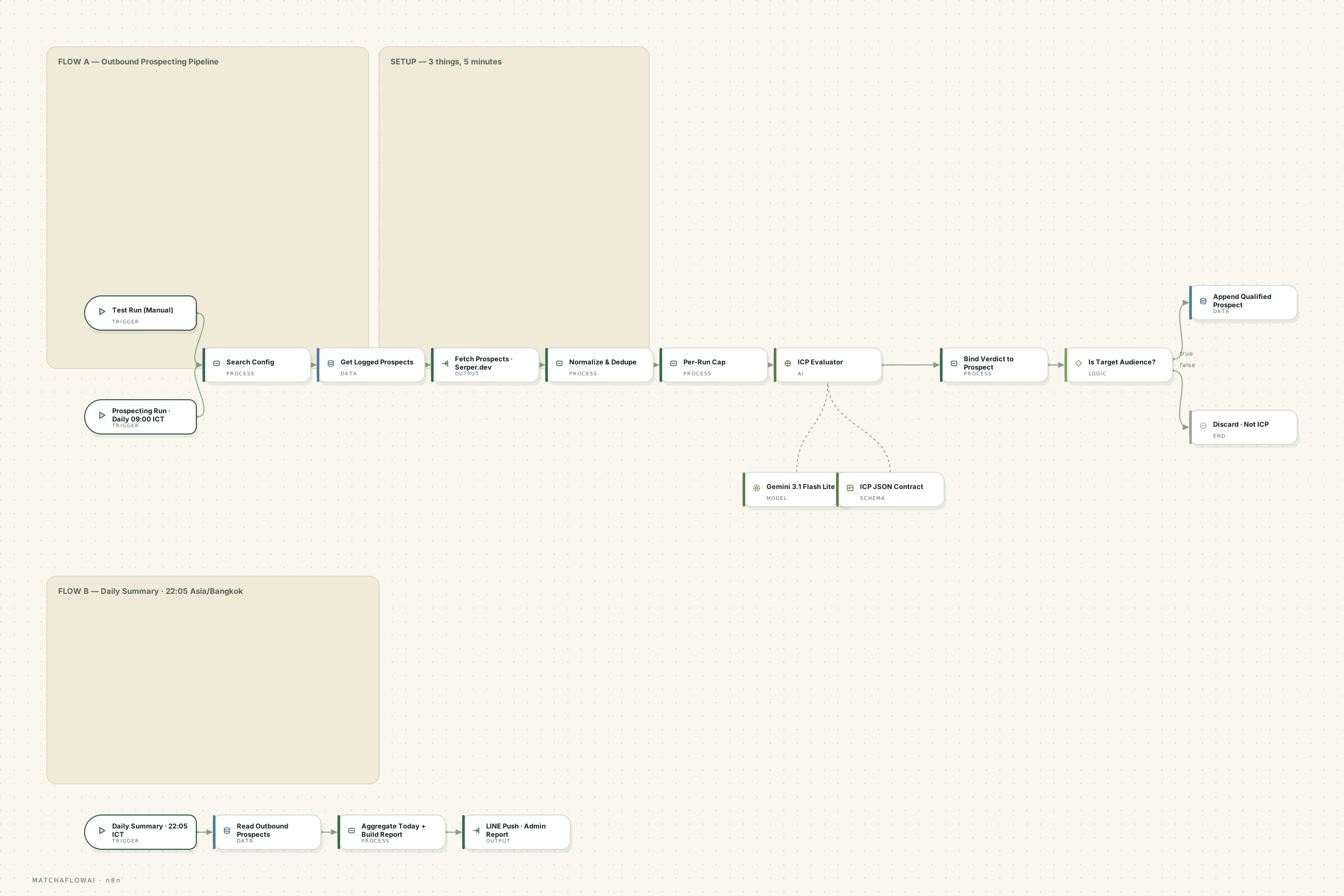
Workflow diagram
n8n workflow
Information
Runs on a schedule, searches for businesses matching a defined target profile, removes anything already on the list, evaluates each one against your ideal-customer criteria, and stores only the prospects that genuinely fit — with the reasoning kept alongside them.
The problem it solves
Building a prospect list by hand is slow and inconsistent. Hours go into searching, opening tabs, copying names into a sheet and guessing whether a business is worth approaching. The same businesses get added twice, criteria drift between sessions, and there is no record of why anything was included.
How it is solved
The search runs on a schedule with a configurable query. Results are normalised and checked against what has already been logged. Each remaining prospect is evaluated against a written ideal-customer profile, given a fit assessment and a likely pain point, and only those that pass the gate are appended to the list. A daily summary reports what was found.
How it works
- 01A daily schedule (or a manual test run) starts the prospecting pass.
- 02A configuration step holds the search query, location, result count and per-run cap in one editable place.
- 03Existing logged prospects are loaded so previously seen businesses can be filtered out.
- 04A search API returns business results for the configured query and location.
- 05Results are normalised, deduplicated against the log, and capped so a single run cannot flood the sheet.
- 06Each prospect is evaluated against the ideal-customer profile, returning a structured verdict rather than free text.
- 07The verdict is bound back to the prospect record and a gate keeps only genuine target-audience matches.
- 08Qualified prospects are appended with status New; the rest are discarded on a separate branch.
- 09A second scheduled pass reads the day’s rows, aggregates them, and pushes a summary to the admin channel.
Main capabilities
- Scheduled, repeatable prospecting from a configurable search profile
- Deduplication against everything already logged
- Per-run caps so cost and volume stay predictable
- Structured fit evaluation with a written reason, not just a yes/no
- An estimated pain point captured for each qualified prospect
- A daily summary report of what the run produced
Example business use cases
- An agency building a targeted prospect list in a specific city and vertical
- A B2B service business that wants a steady trickle of researched leads rather than a bulk scrape
- A team that wants the qualification reasoning recorded so the list can be reviewed
- Testing whether a new target segment is worth pursuing before committing to outreach
Inputs
- Search query and location (for example a business category in a specific city)
- Result count and a maximum number of AI evaluations per run
- The written ideal-customer profile and disqualifying criteria
- The existing prospect log, used for deduplication
Processing
- Search API request against the configured profile
- Normalisation, deduplication and per-run capping
- Structured evaluation of each prospect against the target profile
- Gate on the target-audience verdict, then aggregation for the daily report
Outputs
- Qualified prospects appended with business name, contact channel, fit analysis, estimated pain point, website and source
- Status set to New so downstream outreach can pick them up
- Non-matching prospects discarded rather than stored
- A daily summary pushed to the admin channel
Potential integrations
Discovery
- Search APIs
- Maps/places data sources
- Directory exports
Storage
- Google Sheets
- Airtable
- Postgres
Reporting
- LINE
- Slack
AI
- Google Gemini
- OpenAI
- Anthropic Claude
Integrations depend on which accounts and API access a business already has. These are common options, not a guaranteed list.
Limitations
This workflow is a modular starting point, not a finished product. It is adjusted for each business, and there are things it deliberately does not do.
- Result quality depends entirely on the search source — it cannot find businesses that are not discoverable there.
- Public listings often have missing or outdated contact details.
- Fit evaluation is an assessment based on limited public information, not verified knowledge of the business.
- Per-run caps exist for a reason: this is designed for steady, reviewable volume, not bulk list building.
- Whether a given prospecting method is appropriate depends on local rules and platform terms, which are the operator’s responsibility.
Simulator
Run the workflow end to end on demonstration data — from the incoming trigger through processing and decisions to the stored record.
Demo simulator
A scheduled prospecting run searches a target segment and evaluates what it finds.
Ready
0%
Runs entirely in your browser on demonstration data. No message is sent, no record is created, and no live business system is contacted.
Pipeline
- SCHEDULED TRIGGERTrigger
The daily prospecting run starts.
- LOAD CONFIGProcess
Search query, location and per-run caps are read from one config step.
- READ EXISTING LISTData
Already-logged prospects are loaded for deduplication.
- SEARCH PROSPECTSOutput
The search API returns businesses matching the profile.
- NORMALIZE & DEDUPEProcess
Records are cleaned and anything already logged is removed.
- PER-RUN CAPDecision
Volume is capped so cost stays predictable.
- ICP EVALUATIONAI
Each prospect is scored against the ideal-customer profile.
- IS TARGET AUDIENCE?Decision
Only genuine matches with a usable contact channel pass.
- APPEND QUALIFIEDData
Matching prospects are written with status New.
Scheduled run · 09:00
Press EXECUTE WORKFLOW to run the workflow from trigger to stored record.
API Price Comparison
Model choice is a cost decision as much as a quality one. This table is the reference used when scoping a workflow.
- Last updated
- 2026-08-28
- Source
- Built-in defaults
Gemini
Gemini 3 Flash
- Input
- ≈ $0.50
- Output
- ≈ $3
Best for General work, automation, high volume
per 1M tokens · updated 2026-08-28
Gemini
Gemini 3.1 Pro
- Input
- ≈ $2–4
- Output
- ≈ $12–18
Best for Reasoning and complex tasks
per 1M tokens · updated 2026-08-28
OpenAI
GPT-5.6 Luna
- Input
- $0.25
- Output
- $2
Best for High volume, cost-sensitive work
per 1M tokens · updated 2026-08-28
OpenAI
GPT-5.6 Terra
- Input
- $2
- Output
- $12
Best for Balance of cost and capability
per 1M tokens · updated 2026-08-28
OpenAI
GPT-5.6 Sol
- Input
- $4
- Output
- $20
Best for Advanced reasoning and coding
per 1M tokens · updated 2026-08-28
Claude
Claude Haiku 4.5
- Input
- $1
- Output
- $5
Best for Fast and economical
per 1M tokens · updated 2026-08-28
Claude
Claude Sonnet 5
- Input
- $2
- Output
- $10
Best for Agents, automation, coding
per 1M tokens · updated 2026-08-28
Claude
Claude Opus 5
- Input
- $5
- Output
- $25
Best for Heavy reasoning work
per 1M tokens · updated 2026-08-28
marks an estimate, and a range means the provider quotes a band rather than one flat rate.
API pricing can change. Prices shown are for reference and should be verified with the provider. Cost per workflow run also depends on message length, model choice and how many steps call a model — no single provider is always the cheapest or the best fit.
Workflows are modular. If this one is close to what your business needs, it can be adjusted rather than rebuilt.
Discuss a build