Workflow 01 · 9 nodes
CRM Integration
Qualified leads into the CRM, with the follow-up already scheduled
CRM Integration is one of the four automation workflows built by MatchaFlowAI.
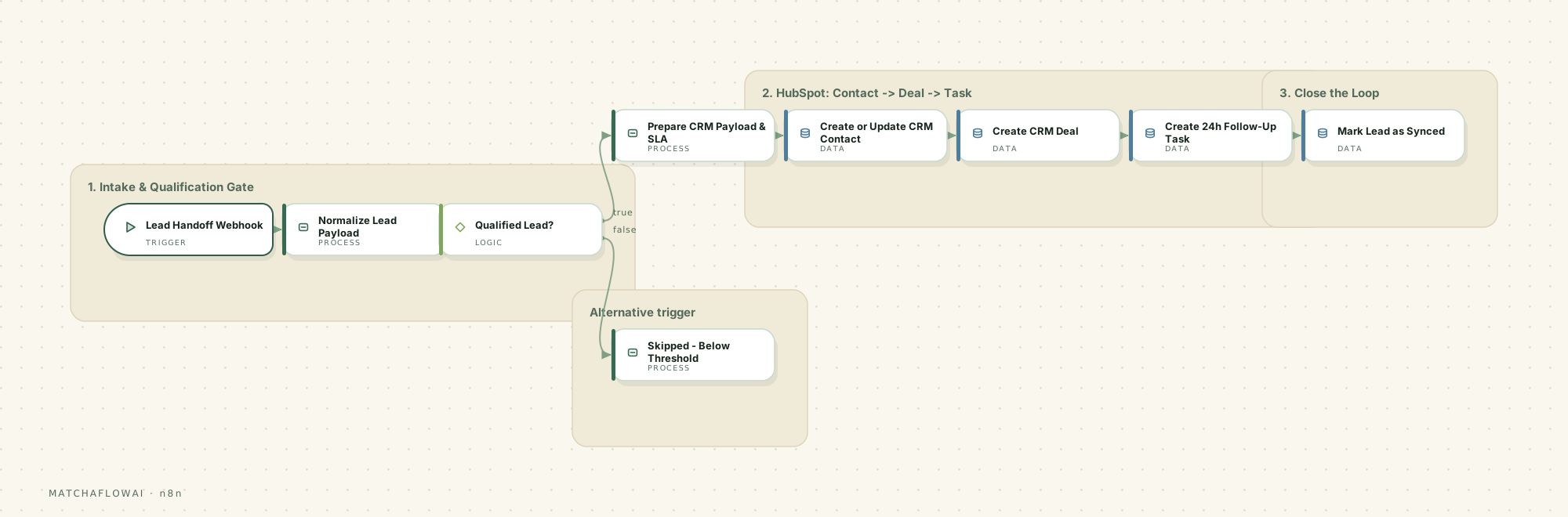
Workflow diagram
n8n workflow
Information
Receives a qualified lead from an upstream workflow, checks it against the qualification threshold, then creates or updates the CRM contact, opens a deal, and schedules the follow-up task — so nothing sits in an inbox waiting to be typed in.
The problem it solves
Lead details arrive in chats, forms and inboxes, then someone has to re-type them into the CRM. It gets done late, inconsistently, or not at all. Deals are created without owners, follow-ups depend on memory, and the spreadsheet and the CRM slowly stop agreeing with each other.
How it is solved
A single handoff point receives the lead, normalises it into one predictable shape, and only writes to the CRM when the lead clears the agreed threshold. Contact, deal and follow-up task are created in one pass, and the source record is marked as synced so the same lead is never entered twice.
How it works
- 01A webhook receives the qualified lead payload from the upstream qualification workflow.
- 02Fields are normalised into one consistent shape regardless of which channel the lead came from.
- 03A conditional gate checks the lead score against the qualification threshold.
- 04Leads that pass get a CRM payload built, including owner assignment and a response-time (SLA) deadline.
- 05The CRM contact is created or updated — matched on email so duplicates are not produced.
- 06A deal is opened against that contact, and a 24-hour follow-up task is attached to it.
- 07The source row is marked as synced; leads below threshold exit on a separate branch with the reason recorded.
Main capabilities
- Create or update a CRM contact without creating duplicates
- Open a deal linked to the correct contact record
- Attach a time-bound follow-up task at handoff
- Apply a configurable qualification threshold before anything is written
- Write back a sync status so records cannot be processed twice
- Keep an explicit reason on the record for anything that was skipped
Example business use cases
- A service business that receives enquiries on several channels but manages pipeline in one CRM
- A team where deals are created but follow-up dates are set inconsistently
- A business whose spreadsheet of leads has drifted out of sync with the CRM
- A studio or clinic that wants only genuinely qualified enquiries reaching the sales pipeline
Inputs
- Lead payload from the qualification workflow (webhook)
- Contact details: name, email, phone, company where available
- Lead score and hot-lead flag
- Source channel and original enquiry summary
Processing
- Field normalisation into one canonical record shape
- Threshold check against the configured qualification score
- CRM payload construction, owner assignment and SLA deadline calculation
- Deduplicated contact upsert, then deal creation, then task creation
Outputs
- CRM contact created or updated
- CRM deal opened at the configured pipeline stage
- Follow-up task due within the configured SLA window
- Source row marked as synced, or marked skipped with the reason
Potential integrations
CRM
- HubSpot
- Pipedrive
- Zoho
- Airtable as a lightweight CRM
Records
- Google Sheets
- Postgres
- Notion
Handoff
- Webhook from any upstream workflow
- Form platforms
- Email parsers
Integrations depend on which accounts and API access a business already has. These are common options, not a guaranteed list.
Limitations
This workflow is a modular starting point, not a finished product. It is adjusted for each business, and there are things it deliberately does not do.
- It writes what it is given — if the upstream qualification is wrong, the CRM record will be wrong.
- Deduplication is only as reliable as the matching key; leads with no email need a different match rule.
- Custom CRM properties must exist in the CRM before the workflow can populate them.
- It does not decide pricing, negotiate, or judge whether a deal is worth pursuing.
- Mapping is specific to each CRM setup and is configured per business rather than shipped as a fixed template.
Simulator
Run the workflow end to end on demonstration data — from the incoming trigger through processing and decisions to the stored record.
Demo simulator
A qualified lead is handed off from the qualification workflow and lands in the CRM.
Ready
0%
Runs entirely in your browser on demonstration data. No message is sent, no record is created, and no live business system is contacted.
Pipeline
- LEAD RECEIVEDTrigger
Webhook accepts the qualified lead payload.
- NORMALIZE PAYLOADProcess
Fields are mapped into one consistent record shape.
- QUALIFIED?Decision
Lead score is checked against the threshold of 7.
- BUILD CRM PAYLOADProcess
Owner assigned and the follow-up SLA deadline calculated.
- UPSERT CONTACTData
Contact matched on email, then created or updated.
- CREATE DEALData
A deal is opened and linked to the contact.
- SCHEDULE FOLLOW-UPOutput
A 24-hour follow-up task is attached to the deal.
- MARK AS SYNCEDData
The source row is flagged so it cannot be processed twice.
Lead handoff · webhook
Press EXECUTE WORKFLOW to run the workflow from trigger to stored record.
API Price Comparison
Model choice is a cost decision as much as a quality one. This table is the reference used when scoping a workflow.
- Last updated
- 2026-08-28
- Source
- Built-in defaults
Gemini
Gemini 3 Flash
- Input
- ≈ $0.50
- Output
- ≈ $3
Best for General work, automation, high volume
per 1M tokens · updated 2026-08-28
Gemini
Gemini 3.1 Pro
- Input
- ≈ $2–4
- Output
- ≈ $12–18
Best for Reasoning and complex tasks
per 1M tokens · updated 2026-08-28
OpenAI
GPT-5.6 Luna
- Input
- $0.25
- Output
- $2
Best for High volume, cost-sensitive work
per 1M tokens · updated 2026-08-28
OpenAI
GPT-5.6 Terra
- Input
- $2
- Output
- $12
Best for Balance of cost and capability
per 1M tokens · updated 2026-08-28
OpenAI
GPT-5.6 Sol
- Input
- $4
- Output
- $20
Best for Advanced reasoning and coding
per 1M tokens · updated 2026-08-28
Claude
Claude Haiku 4.5
- Input
- $1
- Output
- $5
Best for Fast and economical
per 1M tokens · updated 2026-08-28
Claude
Claude Sonnet 5
- Input
- $2
- Output
- $10
Best for Agents, automation, coding
per 1M tokens · updated 2026-08-28
Claude
Claude Opus 5
- Input
- $5
- Output
- $25
Best for Heavy reasoning work
per 1M tokens · updated 2026-08-28
marks an estimate, and a range means the provider quotes a band rather than one flat rate.
API pricing can change. Prices shown are for reference and should be verified with the provider. Cost per workflow run also depends on message length, model choice and how many steps call a model — no single provider is always the cheapest or the best fit.
Workflows are modular. If this one is close to what your business needs, it can be adjusted rather than rebuilt.
Discuss a build