Workflow 04 · 15 nodes
Smart Lead Qualifier
Reads every inbound enquiry, scores intent, and alerts the team only when it matters
Smart Lead Qualifier is one of the four automation workflows built by MatchaFlowAI.
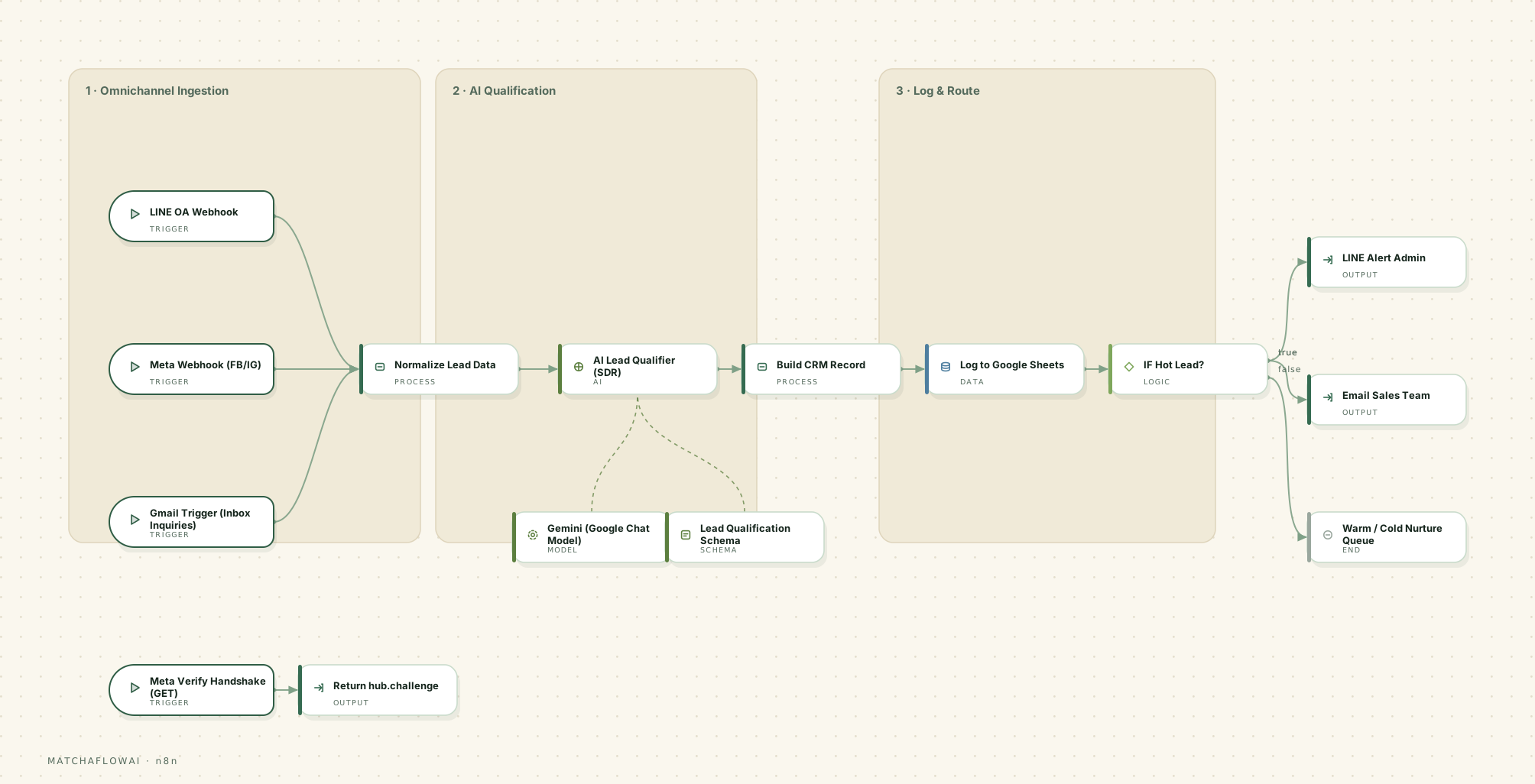
Workflow diagram
n8n workflow
Information
Takes inbound messages from several channels into one normaliser, reads each enquiry to work out intent and buying signals, produces a structured qualification record with a score from 1 to 10, logs it, and alerts the sales team only for genuinely hot leads.
The problem it solves
Enquiries arrive across messaging apps and email in every possible phrasing. Someone has to read each one, work out what the person actually wants, decide whether it is serious, and record it. Real opportunities sit unread next to spam, and there is no consistent record of why a lead was treated as important.
How it is solved
Every channel feeds one normaliser, so the rest of the workflow deals with a single shape regardless of origin. Each message is read and returned as a structured record — intent summary, stated budget, a 1–10 intent score, a hot-lead flag, a recommended action and the reasoning behind the score. Everything is logged; only hot leads raise an alert.
How it works
- 01Messaging webhooks and an email trigger all feed into one normaliser, including the platform verification handshake.
- 02Incoming events are normalised into one record: source, sender, contact detail, message text and timestamp.
- 03The message is analysed against a defined qualification brief; it is treated strictly as data, never as instructions.
- 04A fixed output schema is enforced, so every result has the same fields and value ranges.
- 05The qualification record is assembled with the original message and timestamps attached.
- 06Everything is appended to the lead log — qualified or not — so the record is complete.
- 07A conditional check on the hot-lead flag decides whether to alert.
- 08Hot leads notify the admin channel and the sales inbox; warm and cold leads go to the nurture queue.
Main capabilities
- One normalised intake across multiple messaging channels and email
- Intent extraction from everyday language, including mixed-language messages
- A consistent 1–10 intent score with written reasoning attached
- Budget captured when stated, and explicitly left empty when not
- A hot-lead flag driving alerting, so the team is not notified for everything
- Resistance to prompt-injection attempts hidden inside inbound messages
- A complete log of every enquiry, including the ones that were not qualified
Example business use cases
- A clinic or salon receiving booking enquiries across LINE, Instagram and email
- A retail or equipment business separating genuine purchase intent from general questions
- A service business that wants an immediate alert for high-intent enquiries only
- Any team that needs a consistent record of what was asked and how it was assessed
Inputs
- Inbound messages from messaging platform webhooks
- Inbox enquiries collected by the email trigger
- Sender identifier and available contact detail
- The qualification brief defining what counts as a strong lead
Processing
- Channel normalisation into one canonical event shape
- Intent analysis and detail extraction from the message text
- Schema-enforced scoring, flagging and recommended action
- Conditional routing based on the hot-lead flag
Outputs
- A qualification record: intent summary, budget when stated, score 1–10, hot-lead flag, recommended action and reasoning
- A row appended to the lead log for every enquiry received
- An alert to the admin channel and sales inbox for hot leads only
- Warm and cold leads placed in the nurture queue
Potential integrations
Channels
- LINE Official Account
- Facebook Messenger
- Email inbox
Records
- Google Sheets
- CRM systems
- Postgres
Alerting
- LINE push
- Email to sales
- Slack
AI
- Google Gemini
- OpenAI
- Anthropic Claude
Integrations depend on which accounts and API access a business already has. These are common options, not a guaranteed list.
Limitations
This workflow is a modular starting point, not a finished product. It is adjusted for each business, and there are things it deliberately does not do.
- A score is an assessment of the message, not a verified fact about the business behind it.
- Ambiguous or very short messages produce low-confidence results, which is why a handover path exists.
- It classifies and extracts — in this workflow it does not reply to the customer.
- Each channel requires its own approved business account and API access before it can be connected.
- The scoring criteria have to be defined per business; the thresholds shown here are examples, not universal values.
Simulator
Run the workflow end to end on demonstration data — from the incoming trigger through processing and decisions to the stored record.
Demo simulator
A customer message arrives on a messaging channel and is qualified end to end.
Ready
0%
Runs entirely in your browser on demonstration data. No message is sent, no record is created, and no live business system is contacted.
Pipeline
- MESSAGE RECEIVEDTrigger
A webhook receives the inbound message event.
- NORMALIZE LEAD DATAProcess
All channels are reduced to one record shape.
- ANALYZE REQUESTAI
Intent and useful details are read out of the message.
- APPLY SCHEMAProcess
The result is forced into a fixed structure with valid ranges.
- BUILD RECORDProcess
The qualification record is assembled with timestamps.
- STORE DATAData
The enquiry is logged whether or not it qualified.
- HOT LEAD?Decision
The hot-lead flag decides whether anyone is alerted.
- ALERT SALESOutput
The admin channel and sales inbox are notified.
Messaging channel · inbound
Press EXECUTE WORKFLOW to run the workflow from trigger to stored record.
API Price Comparison
Model choice is a cost decision as much as a quality one. This table is the reference used when scoping a workflow.
- Last updated
- 2026-08-28
- Source
- Built-in defaults
Gemini
Gemini 3 Flash
- Input
- ≈ $0.50
- Output
- ≈ $3
Best for General work, automation, high volume
per 1M tokens · updated 2026-08-28
Gemini
Gemini 3.1 Pro
- Input
- ≈ $2–4
- Output
- ≈ $12–18
Best for Reasoning and complex tasks
per 1M tokens · updated 2026-08-28
OpenAI
GPT-5.6 Luna
- Input
- $0.25
- Output
- $2
Best for High volume, cost-sensitive work
per 1M tokens · updated 2026-08-28
OpenAI
GPT-5.6 Terra
- Input
- $2
- Output
- $12
Best for Balance of cost and capability
per 1M tokens · updated 2026-08-28
OpenAI
GPT-5.6 Sol
- Input
- $4
- Output
- $20
Best for Advanced reasoning and coding
per 1M tokens · updated 2026-08-28
Claude
Claude Haiku 4.5
- Input
- $1
- Output
- $5
Best for Fast and economical
per 1M tokens · updated 2026-08-28
Claude
Claude Sonnet 5
- Input
- $2
- Output
- $10
Best for Agents, automation, coding
per 1M tokens · updated 2026-08-28
Claude
Claude Opus 5
- Input
- $5
- Output
- $25
Best for Heavy reasoning work
per 1M tokens · updated 2026-08-28
marks an estimate, and a range means the provider quotes a band rather than one flat rate.
API pricing can change. Prices shown are for reference and should be verified with the provider. Cost per workflow run also depends on message length, model choice and how many steps call a model — no single provider is always the cheapest or the best fit.
Workflows are modular. If this one is close to what your business needs, it can be adjusted rather than rebuilt.
Discuss a build